
Nightingale Rose Chart
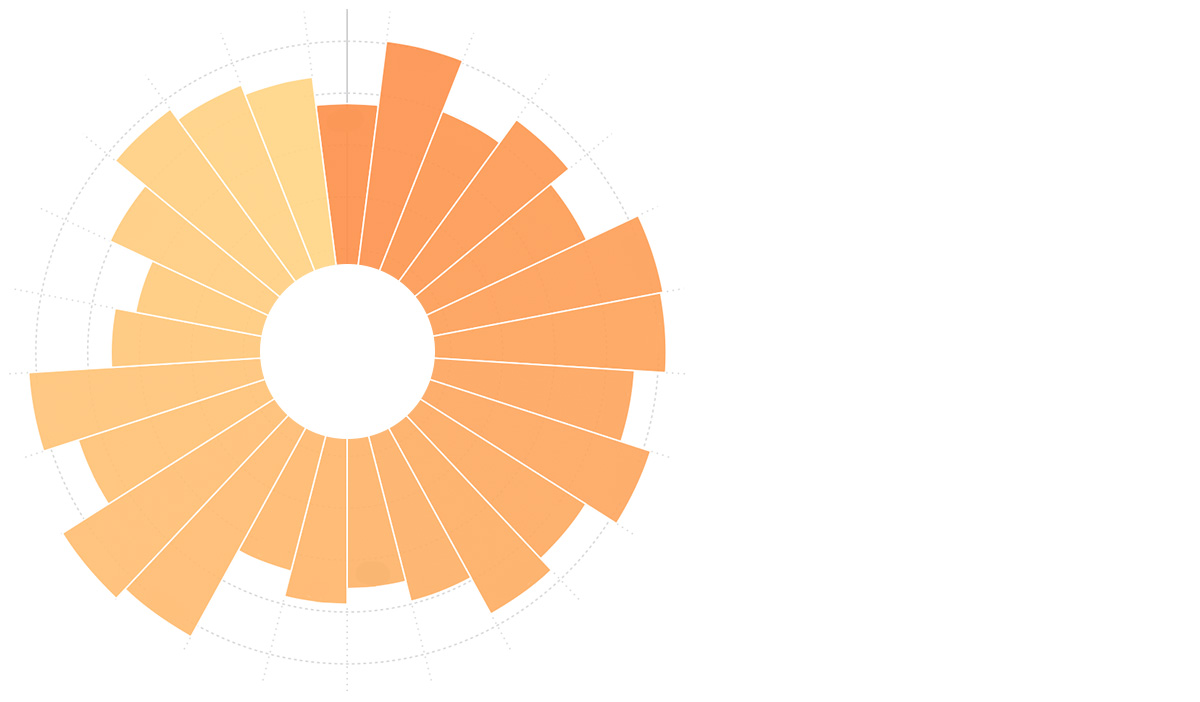
Introduction to Nightingale Rose Charts
The Nightingale Rose Chart (also known as Coxcomb Chart or Polar Area Diagram) is a chart form invented by Florence Nightingale during the Crimean War for a report on soldier mortality.
The Nightingale Rose Chart is a bar chart plotted in polar coordinates, using the radius of circular arcs to represent the magnitude of data (the quantity).
- Due to the square relationship between radius and area, the Nightingale Rose Chart exaggerates the proportional size of data, making it particularly suitable for comparing values that are close in magnitude.
- Due to the cyclical nature of circles, the rose chart is also suitable for representing time concepts within a cycle, such as days of the week or months.
Other Names
Nightingale Rose Chart, Coxcomb Chart, Polar Area Diagram
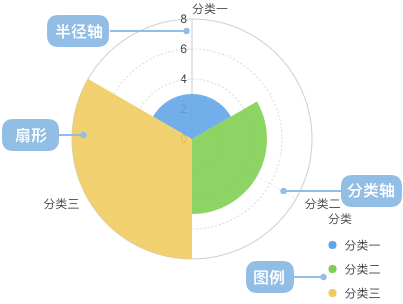
Components of a Nightingale Rose Chart
| Chart Type | Nightingale Rose Chart |
|---|---|
| Suitable Data | List: One categorical data field, one continuous data field |
| Functionality | Comparing the numerical values of categorical data |
| Data-to-Graphic Mapping | Categorical data field maps to the position on the category axis Continuous data field maps to the height on the radius axis Categorical data can also set color to enhance category distinction |
| Suitable Data Count | Not exceeding 30 data items |
Use Cases of Nightingale Rose Charts
Suitable Use Cases
Example 1: Comparing the size of different categories
The chart below shows a comparison of manufacturing indices for various countries, with the United States as the benchmark (100). China’s manufacturing cost index is 96, meaning that if a product costs $1 to manufacture in the US, it would cost $0.96 in China. The chart indicates that China’s manufacturing advantage is no longer significant.
| country(Country) | cost(Manufacturing Index) |
|---|---|
| China | 96 |
| Germany | 121 |
| United States | 100 |
| Japan | 111 |
| South Korea | 102 |
| … | … |
import { Chart } from '@antv/g2';

const chart = new Chart({
  container: 'container',
  theme: 'classic',
});

chart.options({
  type: 'interval',
  autoFit: true,
  coordinate: { type: 'polar' },
  data: [
    { country: 'China', cost: 96 },
    { country: 'Germany', cost: 121 },
    { country: 'USA', cost: 100 },
    { country: 'Japan', cost: 111 },
    { country: 'Korea', cost: 102 },
    { country: 'France', cost: 124 },
    { country: 'Italy', cost: 123 },
    { country: 'Netherlands', cost: 111 },
    { country: 'Belgium', cost: 123 },
    { country: 'UK', cost: 109 },
    { country: 'Canada', cost: 115 },
    { country: 'Russia', cost: 99 },
    { country: 'Mexico', cost: 91 },
    { country: 'India', cost: 87 },
    { country: 'Switzerland', cost: 125 },
    { country: 'Australia', cost: 130 },
    { country: 'Spain', cost: 109 },
    { country: 'Brazil', cost: 123 },
    { country: 'Thailand', cost: 91 },
    { country: 'Indonesia', cost: 83 },
    { country: 'Poland', cost: 101 },
    { country: 'Sweden', cost: 116 },
    { country: 'Austria', cost: 111 },
    { country: 'Czech', cost: 107 },
  ],
  encode: {
    x: 'country',
    y: 'cost',
    color: 'country',
  },
  scale: {
    y: { nice: true },
    color: { palette: 'category20' },
  },
  axis: {
    y: { labelFormatter: null },
    x: { grid: true },
  },
  interaction: [
    {
      type: 'elementHighlight',
      background: true,
    },
  ],
});

chart.render();
Unsuitable Use Cases
Example 1: Scenarios with too few categories
The chart below shows the number of male and female students in a class. This scenario compares a rose chart with a pie chart. When there are very few categories, a pie chart is more suitable than a rose chart.
| gender | count |
|---|---|
| Male | 40 |
| Female | 30 |
Rose Chart
import { Chart } from '@antv/g2';

const chart = new Chart({
  container: 'container',
  theme: 'classic',
});

chart.options({
  type: 'interval',
  autoFit: true,
  coordinate: { type: 'polar' },
  data: [
    { gender: 'Male', count: 40 },
    { gender: 'Female', count: 30 },
  ],
  encode: {
    x: 'gender',
    y: 'count',
    color: 'gender',
  },
  scale: {
    y: { nice: true, min: 0 },
  },
});

chart.render();
Pie Chart
import { Chart } from '@antv/g2';

const chart = new Chart({
  container: 'container',
  theme: 'classic',
});

chart.options({
  type: 'interval',
  autoFit: true,
  coordinate: { type: 'polar' },
  data: [
    { gender: 'Male', count: 40 },
    { gender: 'Female', count: 30 },
  ],
  encode: {
    x: 'gender',
    y: 'count',
    color: 'gender',
  },
  scale: {
    y: { nice: true, min: 0 },
  },
});

chart.render();
Example 2: Scenarios with vastly different category values
Below, a Nightingale Rose Chart and a horizontal bar chart are used to display population data for various provinces. In this scenario, using a rose chart is inappropriate because the vast differences in values make it difficult to observe smaller categories. A horizontal bar chart is recommended.
| province | population |
|---|---|
| Beijing | 19,612,368 |
| Tianjin | 12,938,693 |
| Hebei | 71,854,210 |
| Shanxi | 27,500,000 |
| … | … |
Nightingale Rose Chart (Not Recommended)
import { Chart } from '@antv/g2';

const chart = new Chart({
  container: 'container',
  theme: 'classic',
});

chart.options({
  type: 'interval',
  autoFit: true,
  coordinate: { type: 'polar' },
  data: [
    { province: 'Beijing', population: 19612368 },
    { province: 'Tianjin', population: 12938693 },
    { province: 'Hebei', population: 71854210 },
    { province: 'Shanxi', population: 27500000 },
    { province: 'Inner Mongolia', population: 24706291 },
    { province: 'Liaoning', population: 43746323 },
    { province: 'Jilin', population: 27452815 },
    { province: 'Heilongjiang', population: 38313991 },
    { province: 'Shanghai', population: 23019196 },
    { province: 'Jiangsu', population: 78660941 },
    { province: 'Zhejiang', population: 54426891 },
    { province: 'Anhui', population: 59500468 },
    { province: 'Fujian', population: 36894217 },
    { province: 'Jiangxi', population: 44567797 },
    { province: 'Shandong', population: 95792719 },
    { province: 'Henan', population: 94029939 },
    { province: 'Hubei', population: 57237727 },
    { province: 'Hunan', population: 65700762 },
    { province: 'Guangdong', population: 104320459 },
    { province: 'Guangxi', population: 46023761 },
    { province: 'Hainan', population: 8671485 },
    { province: 'Chongqing', population: 28846170 },
    { province: 'Sichuan', population: 80417528 },
    { province: 'Guizhou', population: 34748556 },
    { province: 'Yunnan', population: 45966766 },
    { province: 'Tibet', population: 3002165 },
    { province: 'Shaanxi', population: 37327379 },
    { province: 'Gansu', population: 25575263 },
    { province: 'Qinghai', population: 5626723 },
  ],
  encode: {
    x: 'province',
    y: 'population',
    color: 'province',
  },
  scale: {
    y: { nice: true },
    color: { palette: 'category20' },
  },
  axis: {
    y: { labelFormatter: null },
    x: {
      labelFormatter: (text) =>
        text.length > 6 ? text.slice(0, 6) + '...' : text,
      labelRotate: Math.PI / 4,
    },
  },
});

chart.render();
Horizontal Bar Chart (Recommended)
import { Chart } from '@antv/g2';

const chart = new Chart({
  container: 'container',
  theme: 'classic',
});

chart.options({
  type: 'interval',
  autoFit: true,
  coordinate: { type: 'rect' },
  data: [
    { province: 'Beijing', population: 19612368 },
    { province: 'Tianjin', population: 12938693 },
    { province: 'Hebei', population: 71854210 },
    { province: 'Shanxi', population: 27500000 },
    { province: 'Inner Mongolia', population: 24706291 },
    { province: 'Liaoning', population: 43746323 },
    { province: 'Jilin', population: 27452815 },
    { province: 'Heilongjiang', population: 38313991 },
    { province: 'Shanghai', population: 23019196 },
    { province: 'Jiangsu', population: 78660941 },
    { province: 'Zhejiang', population: 54426891 },
    { province: 'Anhui', population: 59500468 },
    { province: 'Fujian', population: 36894217 },
    { province: 'Jiangxi', population: 44567797 },
    { province: 'Shandong', population: 95792719 },
    { province: 'Henan', population: 94029939 },
    { province: 'Hubei', population: 57237727 },
    { province: 'Hunan', population: 65700762 },
    { province: 'Guangdong', population: 104320459 },
    { province: 'Guangxi', population: 46023761 },
    { province: 'Hainan', population: 8671485 },
    { province: 'Chongqing', population: 28846170 },
    { province: 'Sichuan', population: 80417528 },
    { province: 'Guizhou', population: 34748556 },
    { province: 'Yunnan', population: 45966766 },
    { province: 'Tibet', population: 3002165 },
    { province: 'Shaanxi', population: 37327379 },
    { province: 'Gansu', population: 25575263 },
    { province: 'Qinghai', population: 5626723 },
  ],
  encode: {
    x: 'province',
    y: 'population',
    color: 'province',
  },
  scale: {
    y: { nice: true },
    color: { palette: 'category20' },
  },
  axis: {
    y: { labelFormatter: null },
    x: {
      labelFormatter: (text) =>
        text.length > 6 ? text.slice(0, 6) + '...' : text,
      labelRotate: Math.PI / 4,
    },
  },
});

chart.render();
Example 3: Scenarios where some category values are too small
The chart below shows the pass rates for various subjects in a class, displayed using both a Nightingale Rose Chart and a horizontal bar chart. In this scenario, because some category values are too small, using a Nightingale Rose Chart can distort the graph, making it difficult to observe the true proportions of the data.
| Subject | Pass Rate |
|---|---|
| Math | 98% |
| English | 95% |
| Physics | 60% |
| Chemistry | 55% |
| Biology | 30% |
| Geography | 5% |
Nightingale Rose Chart (Not Recommended)
import { Chart } from '@antv/g2';

const chart = new Chart({
  container: 'container',
  theme: 'classic',
});

chart.options({
  type: 'interval',
  autoFit: true,
  coordinate: { type: 'polar' },
  data: [
    { subject: 'Math', passRate: 98 },
    { subject: 'English', passRate: 95 },
    { subject: 'Physics', passRate: 60 },
    { subject: 'Chemistry', passRate: 55 },
    { subject: 'Biology', passRate: 30 },
    { subject: 'Geography', passRate: 5 },
  ],
  encode: {
    x: 'subject',
    y: 'passRate',
    color: 'subject',
  },
  scale: {
    y: { nice: true },
    color: { palette: 'category20' },
  },
  axis: {
    y: { labelFormatter: null },
    x: {
      labelFormatter: (text) =>
        text.length > 6 ? text.slice(0, 6) + '...' : text,
      labelRotate: Math.PI / 4,
    },
  },
});

chart.render();
Horizontal Bar Chart (Recommended)
import { Chart } from '@antv/g2';

const chart = new Chart({
  container: 'container',
  theme: 'classic',
});

chart.options({
  type: 'interval',
  autoFit: true,
  coordinate: { type: 'rect' },
  data: [
    { subject: 'Math', passRate: 98 },
    { subject: 'English', passRate: 95 },
    { subject: 'Physics', passRate: 60 },
    { subject: 'Chemistry', passRate: 55 },
    { subject: 'Biology', passRate: 30 },
    { subject: 'Geography', passRate: 5 },
  ],
  encode: {
    x: 'subject',
    y: 'passRate',
    color: 'subject',
  },
  scale: {
    y: { nice: true },
    color: { palette: 'category20' },
  },
  axis: {
    y: { labelFormatter: null },
    x: {
      labelFormatter: (text) =>
        text.length > 6 ? text.slice(0, 6) + '...' : text,
      labelRotate: Math.PI / 4,
    },
  },
});

chart.render();
Extensions of Nightingale Rose Charts
Fan-shaped Rose Chart
A sector Nightingale Rose Chart can be achieved by setting the start angle of the polar coordinates:
import { Chart } from '@antv/g2';

const chart = new Chart({
  container: 'container',
  theme: 'classic',
});

chart.options({
  type: 'interval',
  autoFit: true,
  coordinate: {
    type: 'polar',
    startAngle: Math.PI,
    endAngle: Math.PI * (3 / 2),
  },
  data: [
    { country: 'China', cost: 96 },
    { country: 'Germany', cost: 121 },
    { country: 'USA', cost: 100 },
    { country: 'Japan', cost: 111 },
    { country: 'Korea', cost: 102 },
    { country: 'France', cost: 124 },
    { country: 'Italy', cost: 123 },
    { country: 'Netherlands', cost: 111 },
    { country: 'Belgium', cost: 123 },
    { country: 'UK', cost: 109 },
    { country: 'Canada', cost: 115 },
    { country: 'Russia', cost: 99 },
  ],
  encode: {
    x: 'country',
    y: 'cost',
    color: 'country',
  },
  scale: {
    y: { nice: true },
    color: { range: ['#fc8f48', '#ffd787'] },
  },
  style: {
    lineWidth: 1,
    stroke: '#fff',
  },
  labels: [
    {
      text: 'cost',
      style: {
        textAlign: 'center',
        fontSize: 10,
        fontWeight: 'bold',
      },
      transform: [{ type: 'overlapDodgeY' }],
    },
  ],
});

chart.render();
Stacked Rose Chart
The Nightingale Rose Chart is essentially a bar chart plotted in polar coordinates. If a bar chart is extended to a stacked bar chart, a stacked rose chart can also be implemented.
The chart below shows refugee data from the last decade, broadly categorized into refugees who have crossed national borders, internally displaced persons who have not, and asylum-seekers who have not yet obtained refugee status.
| year | internally displaced persons | refugees (crossed borders) | asylum-seekers |
|---|---|---|---|
| 2000 | 21.0 | 16 | 0.8 |
| 2001 | 25.0 | 16 | 0.8 |
| … | … | … | … |
import { Chart } from '@antv/g2';

const chart = new Chart({
  container: 'container',
  theme: 'classic',
});

chart.options({
  type: 'interval',
  autoFit: true,
  coordinate: {
    type: 'polar',
    innerRadius: 0.1,
  },
  data: [
    { year: '2000', type: 'Internally Displaced', count: 21.0 },
    { year: '2000', type: 'Cross-border Refugees', count: 16 },
    { year: '2000', type: 'Asylum Seekers', count: 0.8 },
    { year: '2001', type: 'Internally Displaced', count: 25.0 },
    { year: '2001', type: 'Cross-border Refugees', count: 16 },
    { year: '2001', type: 'Asylum Seekers', count: 0.8 },
    { year: '2002', type: 'Internally Displaced', count: 25.0 },
    { year: '2002', type: 'Cross-border Refugees', count: 15 },
    { year: '2002', type: 'Asylum Seekers', count: 0.8 },
    { year: '2003', type: 'Internally Displaced', count: 25.0 },
    { year: '2003', type: 'Cross-border Refugees', count: 14 },
    { year: '2003', type: 'Asylum Seekers', count: 0.7 },
    { year: '2004', type: 'Internally Displaced', count: 25.0 },
    { year: '2004', type: 'Cross-border Refugees', count: 14 },
    { year: '2004', type: 'Asylum Seekers', count: 0.7 },
    { year: '2005', type: 'Internally Displaced', count: 24.0 },
    { year: '2005', type: 'Cross-border Refugees', count: 13 },
    { year: '2005', type: 'Asylum Seekers', count: 0.8 },
    { year: '2006', type: 'Internally Displaced', count: 24.0 },
    { year: '2006', type: 'Cross-border Refugees', count: 14 },
    { year: '2006', type: 'Asylum Seekers', count: 0.7 },
    { year: '2007', type: 'Internally Displaced', count: 26.0 },
    { year: '2007', type: 'Cross-border Refugees', count: 16 },
    { year: '2007', type: 'Asylum Seekers', count: 0.7 },
    { year: '2008', type: 'Internally Displaced', count: 26.0 },
    { year: '2008', type: 'Cross-border Refugees', count: 15.2 },
    { year: '2008', type: 'Asylum Seekers', count: 0.8 },
    { year: '2009', type: 'Internally Displaced', count: 27.1 },
    { year: '2009', type: 'Cross-border Refugees', count: 15.2 },
    { year: '2009', type: 'Asylum Seekers', count: 1.0 },
    { year: '2010', type: 'Internally Displaced', count: 27.5 },
    { year: '2010', type: 'Cross-border Refugees', count: 15.4 },
    { year: '2010', type: 'Asylum Seekers', count: 0.8 },
    { year: '2011', type: 'Internally Displaced', count: 26.4 },
    { year: '2011', type: 'Cross-border Refugees', count: 15.2 },
    { year: '2011', type: 'Asylum Seekers', count: 0.9 },
    { year: '2012', type: 'Internally Displaced', count: 28.8 },
    { year: '2012', type: 'Cross-border Refugees', count: 15.4 },
    { year: '2012', type: 'Asylum Seekers', count: 0.9 },
    { year: '2013', type: 'Internally Displaced', count: 33.3 },
    { year: '2013', type: 'Cross-border Refugees', count: 16.7 },
    { year: '2013', type: 'Asylum Seekers', count: 1.2 },
    { year: '2014', type: 'Internally Displaced', count: 38.2 },
    { year: '2014', type: 'Cross-border Refugees', count: 19.5 },
    { year: '2014', type: 'Asylum Seekers', count: 1.8 },
  ],
  encode: {
    x: 'year',
    y: 'count',
    color: 'type',
    series: 'type',
  },
  transform: [{ type: 'stackY' }],
  scale: {
    color: {
      range: ['rgb(136,186,174)', 'rgb(184,189,61)', 'rgb(107,136,138)'],
    },
  },
  style: {
    stroke: 'white',
    lineWidth: 1,
  },
});

chart.render();
Comparing Nightingale Rose Charts to Other Charts
Nightingale Rose Charts, Line Charts, and Pie Charts
Nightingale Rose Charts and Pie Charts
- Nightingale Rose Charts use the radius of sectors to represent numerical values, while pie charts use the arc length (angle) of sectors to represent data proportions.
- Nightingale Rose Charts can typically display more categories simultaneously than pie charts. (Note: Comparison with Line Charts is not detailed in this section based on the source material.)
Nightingale Rose Charts and Bar Charts
- The Nightingale Rose Chart is essentially a bar chart displayed in polar coordinates.
- Bar charts use the height of rectangles to represent numerical values.
- Nightingale Rose Charts use the radius of sectors to represent numerical values.


