Distribution Curve
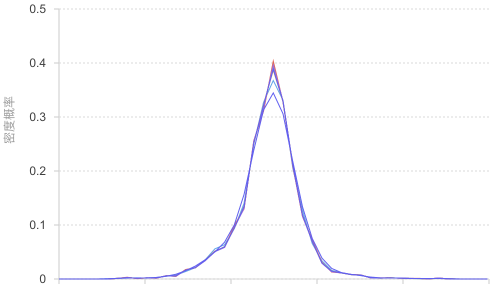
Introduction to Distribution Curve
A distribution curve is a statistical chart used to display the frequency distribution of data, intuitively reflecting the distribution density and central tendency of data across different value intervals through smooth curve forms. It is an important visualization tool for understanding data distribution characteristics and identifying data patterns.
Distribution curves are particularly suitable for exploratory data analysis, comparing distributions across multiple groups, data quality checking, and identifying statistical distribution characteristics, making them important tools in statistical analysis and data science.
English Name: Distribution Curve, Frequency Curve, Density Curve
Components of Distribution Curve
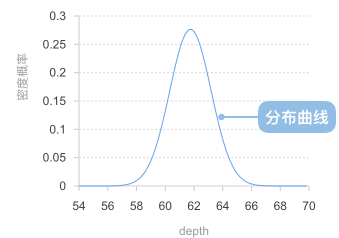
A distribution curve consists of the following elements:
- Horizontal axis: represents the independent variable
- Vertical axis: represents the dependent variable
- Distribution curve representing probability distribution
Application Scenarios for Distribution Curves
Suitable Scenarios
Example 1: Displaying distribution characteristics of normal distribution data
Distribution curves are very suitable for displaying normal distribution data, clearly showing the central tendency, symmetry, and distribution shape of the data.
import { Chart } from '@antv/g2';

// Generate normal distribution data
const generateNormalData = (count, mean, std) => {
  const data = [];
  for (let i = 0; i < count; i++) {
    // Use Box-Muller transform to generate normal distribution data
    const u1 = Math.random();
    const u2 = Math.random();
    const z0 = Math.sqrt(-2 * Math.log(u1)) * Math.cos(2 * Math.PI * u2);
    data.push({ value: mean + std * z0 });
  }
  return data;
};

const chart = new Chart({
  container: 'container',
  theme: 'classic',
});

chart.options({
  type: 'line',
  data: {
    value: generateNormalData(1000, 100, 15),
    transform: [
      {
        type: 'custom',
        callback: (data) => {
          // Extract numerical data
          const values = data.map(d => d.value).filter(v => !isNaN(v));

          // Calculate data range
          const min = Math.min(...values);
          const max = Math.max(...values);
          const binCount = 30;
          const binWidth = (max - min) / binCount;

          // Create bins
          const bins = Array.from({ length: binCount }, (_, i) => ({
            x0: min + i * binWidth,
            x1: min + (i + 1) * binWidth,
            count: 0,
          }));

          // Count frequency for each bin
          values.forEach(value => {
            const binIndex = Math.min(
              Math.floor((value - min) / binWidth),
              binCount - 1
            );
            bins[binIndex].count++;
          });

          // Calculate frequency density and generate curve data
          const total = values.length;
          return bins.map(bin => ({
            x: (bin.x0 + bin.x1) / 2, // Bin center point
            y: bin.count / total, // Frequency density
            frequency: bin.count,
            range: `${bin.x0.toFixed(1)}-${bin.x1.toFixed(1)}`,
          }));
        },
      },
    ],
  },
  encode: {
    x: 'x',
    y: 'y',
    shape: 'smooth',
  },
  style: {
    lineWidth: 3,
    stroke: '#1890ff',
  },
  axis: {
    x: { title: 'Measured Value' },
    y: { title: 'Frequency Density' },
  },
  tooltip: {
    title: (d) => `Range: ${d.range}`,
    items: [
      { field: 'frequency', name: 'Frequency' },
      { field: 'y', name: 'Frequency Density', valueFormatter: '.3f' },
    ],
  },
});

chart.render();
Description:
- Displays the classic bell-shaped normal distribution curve
- Clearly observes the symmetry and central tendency of the data
- Suitable for data analysis in quality control, biostatistics, psychological measurement, and other fields
Example 2: Comparative analysis of multiple group distributions
When comparing data distributions under different conditions or groups, distribution curves can intuitively show distribution differences between groups.
import { Chart } from '@antv/g2';

const chart = new Chart({
  container: 'container',
  theme: 'classic',
});

chart.options({
  type: 'line',
  data: {
    type: 'fetch',
    value: 'https://assets.antv.antgroup.com/g2/species.json',
    transform: [
      {
        type: 'custom',
        callback: (data) => {
          // Group data by species
          const groups = {};
          data.forEach(d => {
            if (!groups[d.species]) groups[d.species] = [];
            groups[d.species].push(d.y);
          });

          const binCount = 20;
          const results = [];

          // Create distribution curve data for each species
          Object.entries(groups).forEach(([species, values]) => {
            const filteredValues = values.filter(v => !isNaN(v));
            if (filteredValues.length === 0) return;

            const min = Math.min(...filteredValues);
            const max = Math.max(...filteredValues);
            const binWidth = (max - min) / binCount;

            // Create bins
            const bins = Array.from({ length: binCount }, (_, i) => ({
              x0: min + i * binWidth,
              x1: min + (i + 1) * binWidth,
              count: 0,
            }));

            // Count frequencies
            filteredValues.forEach(value => {
              const binIndex = Math.min(
                Math.floor((value - min) / binWidth),
                binCount - 1
              );
              bins[binIndex].count++;
            });

            // Generate curve data
            const total = filteredValues.length;
            bins.forEach(bin => {
              results.push({
                x: (bin.x0 + bin.x1) / 2,
                y: bin.count / total,
                species,
                frequency: bin.count,
                range: `${bin.x0.toFixed(2)}-${bin.x1.toFixed(2)}`,
              });
            });
          });

          return results;
        },
      },
    ],
  },
  encode: {
    x: 'x',
    y: 'y',
    color: 'species',
    shape: 'smooth',
  },
  style: {
    lineWidth: 2,
    strokeOpacity: 0.8,
  },
  axis: {
    x: { title: 'Petal Length' },
    y: { title: 'Frequency Density' },
  },
  legend: {
    color: {
      title: 'Species',
      position: 'right',
    },
  },
  tooltip: {
    title: (d) => `${d.species} - Range: ${d.range}`,
    items: [
      { field: 'frequency', name: 'Frequency' },
      { field: 'y', name: 'Frequency Density', valueFormatter: '.3f' },
    ],
  },
});

chart.render();
Description:
- Compares distribution characteristics of multiple groups through curves of different colors
- Facilitates identification of distribution centers, shapes, and dispersion of each group
- Suitable for A/B testing analysis, experimental control group comparisons, market segmentation analysis, and other scenarios
Unsuitable Scenarios
Example 1: Poor effectiveness with insufficient data
When there are too few data points, binning statistics may not be accurate enough, and the generated distribution curve may not accurately reflect true distribution characteristics.
import { Chart } from '@antv/g2';

// Simulate small amount of data
const smallData = [
  12, 15, 13, 14, 16, 18, 11, 17, 15, 13
];

const chart = new Chart({
  container: 'container',
  theme: 'classic',
  height: 250,
});

chart.options({
  type: 'point',
  data: smallData.map((value, index) => ({ index: index + 1, value })),
  encode: {
    x: 'index',
    y: 'value',
    size: 6,
  },
  style: {
    fill: '#1890ff',
    fillOpacity: 0.8,
  },
  axis: {
    x: { title: 'Data Point Index' },
    y: { title: 'Value' },
  },
  title: 'Scatter plot recommended for small datasets',
});

chart.render();
Problem Description:
- When there are too few data points (less than 30), each interval has too little data after binning
- The generated distribution curve may show artificial fluctuations and irregular shapes
- Cannot accurately reflect true data distribution characteristics
- Recommend using scatter plots, box plots, or increasing data collection
Example 2: Discrete categorical data is not applicable
For discrete categorical data, continuous distribution curves have no practical meaning because there is no continuity relationship between categories.
import { Chart } from '@antv/g2';

// Discrete categorical data
const discreteData = [
  { category: 'Product A', sales: 45 },
  { category: 'Product B', sales: 67 },
  { category: 'Product C', sales: 33 },
  { category: 'Product D', sales: 52 },
  { category: 'Product E', sales: 28 },
];

const chart = new Chart({
  container: 'container',
  theme: 'classic',
  height: 250,
});

chart.options({
  type: 'interval',
  data: discreteData,
  encode: {
    x: 'category',
    y: 'sales',
    color: 'category',
  },
  style: {
    fillOpacity: 0.8,
  },
  axis: {
    x: { title: 'Product Category' },
    y: { title: 'Sales Quantity' },
  },
  title: 'Bar chart recommended for categorical data',
});

chart.render();
Problem Description:
- No continuity relationship exists between categorical data; forcing connections would be misleading
- Distribution curves cannot express the true meaning of categorical data
- Bar charts can more accurately express comparison relationships in categorical data
- Suitable for using discrete chart types such as bar charts and pie charts
Comparison with Other Charts
Distribution Curve vs Histogram
- Distribution curves display continuous frequency distribution through smooth curves, emphasizing overall trends
- Histograms display frequency distribution through rectangular bars with clear interval boundaries
- Distribution curves are more suitable for displaying overall distribution shape and trend identification
- Histograms are more suitable for precise frequency statistics and interval analysis
Distribution Curve vs Violin Plot
- Distribution curves focus on displaying the curve shape of frequency distribution
- Violin plots combine density distribution with statistical summary information from box plots
- Distribution curves are more suitable for pure distribution shape analysis and multi-group comparisons
- Violin plots are more suitable for scenarios requiring statistical summary information
Distribution Curve vs Line Chart
- Distribution curves are based on frequency statistics, displaying data distribution characteristics
- Line charts show data change trends over time or sequence
- Distribution curves are suitable for statistical analysis and distribution exploration
- Line charts are suitable for time series analysis and trend tracking