
Funnel Chart
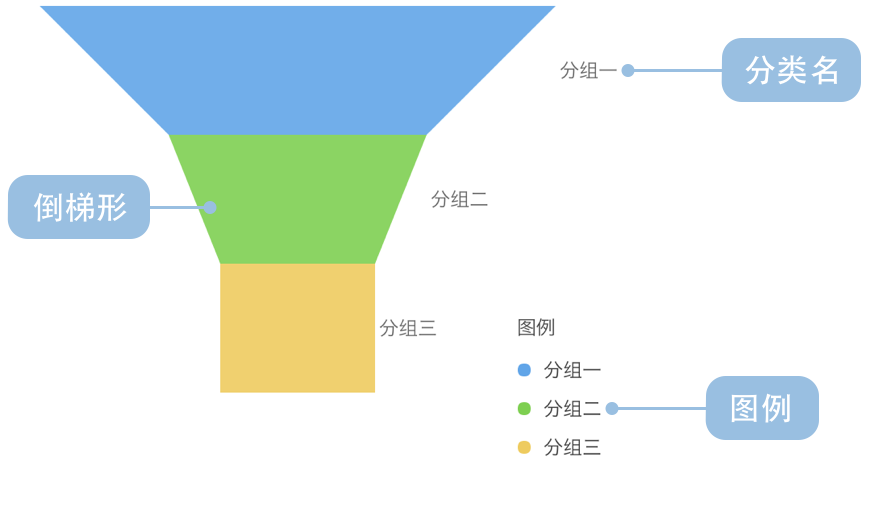
Introduction to Funnel Charts
A funnel chart is a specialized visualization used to represent data flow through different stages of a business process. Named after its resemblance to a physical funnel, it displays data quantities across successive stages, typically with a wide top and narrow bottom, reflecting the process of data loss or conversion.
Funnel charts are particularly suited for visualizing conversion rates in business processes, such as sales pipelines, user registration flows, or marketing funnels. Through funnel charts, you can intuitively observe data changes across various stages and identify critical conversion points or bottlenecks.
Each layer in a funnel chart represents a stage in the process, with the width or area of the layer typically proportional to the quantity of data at that stage, clearly reflecting the data loss during the conversion process.
Other Names: Funnel Diagram, Sales Funnel
Components of a Funnel Chart
Basic Funnel Chart
| Chart Type | Basic Funnel Chart |
|---|---|
| Suitable Data | Ordered categorical data: a categorical field for process stages and a value field for each stage |
| Function | Display data flow and conversion rates across stages of a business process |
| Data-to-Visual Mapping | Stage field mapped to funnel layers Value field mapped to layer width or area Colors distinguish different stages |
| Suitable Scenarios | Analyzing conversions and identifying loss points in multi-stage processes |
Use Cases of Funnel Charts
Suitable Use Cases
Example 1: Sales Process Conversion Analysis
The chart below shows the conversion across different stages of a sales funnel, from initial leads to final deals.
| stage | value |
|---|---|
| Visits | 8043 |
| Inquiries | 2136 |
| Quotes | 908 |
| Negotiations | 691 |
| Deals | 527 |
import { Chart } from '@antv/g2';

const chart = new Chart({
  container: 'container',
  theme: 'classic',
});

chart.options({
  type: 'interval',
  data: [
    { stage: 'Visits', value: 8043 },
    { stage: 'Inquiries', value: 2136 },
    { stage: 'Quotes', value: 908 },
    { stage: 'Negotiations', value: 691 },
    { stage: 'Deals', value: 527 },
  ],
  encode: {
    x: 'stage',
    y: 'value',
    color: 'stage',
    shape: 'funnel',
  },
  coordinate: { transform: [{ type: 'transpose' }] },
  transform: [
    {
      type: 'symmetryY',
    },
  ],
  scale: {
    color: {
      palette: 'spectral',
    },
  },
  style: {
    labelText: (d) => `${d.stage}: ${d.value}`,
  },
  animate: { enter: { type: 'fadeIn' } },
  axis: false,
  labels: [
    {
      text: (d) => `${d.stage}\n${d.value}`,
      position: 'inside',
      transform: [{ type: 'contrastReverse' }],
    },
  ],
  legend: false,
});

chart.render();
Explanation:
- The
stagefield is mapped to each layer of the funnel, representing different stages of the sales process - The
valuefield is mapped to the width of each layer, intuitively showing the conversion from the top to the bottom of the funnel - Through the funnel shape, you can clearly see the conversion rates and loss between stages
Example 2: Website Traffic Conversion Analysis
Funnel charts can effectively analyze the conversion of website traffic from visits to final actions, helping identify key points of user drop-off.
import { Chart } from '@antv/g2';

const chart = new Chart({
  container: 'container',
  theme: 'classic',
});

chart.options({
  type: 'interval',
  data: [
    { stage: 'Homepage Visit', value: 100000, percent: '100%' },
    { stage: 'Product Search', value: 60000, percent: '60%' },
    { stage: 'Product Detail View', value: 30000, percent: '30%' },
    { stage: 'Add to Cart', value: 10000, percent: '10%' },
    { stage: 'Completed Purchase', value: 5000, percent: '5%' },
  ],
  encode: {
    x: 'stage',
    y: 'value',
    color: 'stage',
    shape: 'funnel',
  },
  coordinate: { transform: [{ type: 'transpose' }] },
  transform: [
    {
      type: 'symmetryY',
    },
  ],
  scale: {
    color: {
      palette: 'blues',
    },
  },
  style: {
    labelText: (d) => `${d.stage}: ${d.percent}`,
  },
  animate: { enter: { type: 'fadeIn' } },
  axis: false,
  labels: [
    {
      text: (d) => `${d.stage}\n${d.percent}`,
      position: 'inside',
      transform: [{ type: 'contrastReverse' }],
    },
  ],
  legend: false,
});

chart.render();
Explanation:
- Each layer represents a different stage of website traffic conversion
- The width of each layer reflects the number of users at that stage
- By comparing differences between adjacent layers, you can identify major points of user drop-off
- Percentage labels provide intuitive visualization of conversion effectiveness
Example 3: Comparative Funnel Charts for Different Channels
When you need to compare conversion effectiveness across different channels or time periods, comparative funnel charts are useful for analysis.
import { Chart } from '@antv/g2';

const chart = new Chart({
  container: 'container',
  theme: 'classic',
});

chart.options({
  type: 'view',
  data: [
    { stage: 'Visits', value: 8043, category: 'Channel A' },
    { stage: 'Inquiries', value: 2136, category: 'Channel A' },
    { stage: 'Quotes', value: 908, category: 'Channel A' },
    { stage: 'Negotiations', value: 691, category: 'Channel A' },
    { stage: 'Deals', value: 527, category: 'Channel A' },
    { stage: 'Visits', value: 6841, category: 'Channel B' },
    { stage: 'Inquiries', value: 2761, category: 'Channel B' },
    { stage: 'Quotes', value: 1098, category: 'Channel B' },
    { stage: 'Negotiations', value: 624, category: 'Channel B' },
    { stage: 'Deals', value: 487, category: 'Channel B' },
  ],
  axis: false,
  children: [
    {
      type: 'interval',
      region: { start: { x: 0, y: 0 }, end: { x: 0.48, y: 1 } },
      transform: [
        { type: 'filter', callback: (d) => d.category === 'Channel A' },
      ],
      encode: {
        x: 'stage',
        y: 'value',
        color: 'stage',
        shape: 'funnel',
      },
      coordinate: { transform: [{ type: 'transpose' }] },
      transform: [
        {
          type: 'symmetryY',
        },
      ],
      scale: {
        color: { palette: 'spectral' },
      },
      style: {
        labelText: (d) => `${d.value}`,
      },
      animate: { enter: { type: 'fadeIn' } },
      axis: false,
      labels: [
        {
          text: (d) => `${d.value}`,
          position: 'inside',
          transform: [{ type: 'contrastReverse' }],
        },
      ],
      title: 'Channel A',
    },
    {
      type: 'interval',
      region: { start: { x: 0.52, y: 0 }, end: { x: 1, y: 1 } },
      transform: [
        { type: 'filter', callback: (d) => d.category === 'Channel B' },
      ],
      encode: {
        x: 'stage',
        y: 'value',
        color: 'stage',
        shape: 'funnel',
      },
      coordinate: { transform: [{ type: 'transpose' }] },
      transform: [
        {
          type: 'symmetryY',
        },
      ],
      scale: {
        color: { palette: 'spectral' },
      },
      style: {
        labelText: (d) => `${d.value}`,
      },
      animate: { enter: { type: 'fadeIn' } },
      axis: false,
      labels: [
        {
          text: (d) => `${d.value}`,
          position: 'inside',
          transform: [{ type: 'contrastReverse' }],
        },
      ],
      title: 'Channel B',
    },
  ],
  legend: false,
});

chart.render();
Explanation:
- Side-by-side display of conversion funnels for two channels allows for intuitive comparison
- Consistent color coding for corresponding stages facilitates comparison
- You can clearly observe differences in conversion efficiency across channels at various stages
Example 4: Intuitive and Visual Chart Form, Often Used to Display Hierarchical Structures or Distribution Proportions
Company hierarchy pyramid structure, where employees are divided into multiple levels based on their rank, with significant differences in population proportions, responsibilities, and authority across levels, intuitively reflecting the hierarchical differentiation within the company.
import { Chart } from '@antv/g2';

const chart = new Chart({
  container: 'container',
  theme: 'classic',
});

chart.options({
    type: 'interval',
    coordinate: {
      transform: [{ type: 'transpose' }],
    },
    data: [
      { text: 'Top Level', value: 5 },
      { text: 'Upper Middle', value: 10 },
      { text: 'Middle', value: 20 },
      { text: 'Lower Middle', value: 25 },
      { text: 'Bottom Level', value: 40 },
    ],
    transform: [
      {
        type: 'symmetryY',
      },
    ],
    axis: {
      x: false,
      y: false,
    },
    style: {
      reverse: true,
    },
    encode: {
      x: 'text',
      y: 'value',
      color: 'text',
      shape: 'pyramid',
    },
    scale: {
      x: { paddingOuter: 0, paddingInner: 0 },
      color: { type: 'ordinal' },
    },
    labels: [
      {
        text: (d) => d.text,
        position: "inside"
      },
      {
        text: (d) => d.value + "%",
        position: "inside",
        style: { dy: 15 }
      },
    ]
  })

chart.render();
Explanation:
- Uses
reverse: trueto change the narrowing position of the funnel chart - Population proportions should decrease layer by layer, reflecting the “wide bottom, narrow top” structure
- Population percentages for each level are clearly labeled, facilitating comparison of quantities or proportions between different groups
- Pyramid shape intuitively displays hierarchical distribution and stratification characteristics
Unsuitable Use Cases
Example 1: Not Suitable for Unordered Data or Data Without Clear Hierarchy
The essence of a funnel chart is to display conversion in an ordered process. If the data has no clear sequence or hierarchical relationship, using a funnel chart can be misleading. For such data, bar charts or pie charts might be more appropriate choices.
Example 2: Not Suitable for Data with Fluctuating or Increasing Values Across Stages
Funnel charts typically express a decreasing process from more to less. If there are stages where values increase compared to previous stages (e.g., user numbers increasing due to marketing campaigns), traditional funnel charts may not be suitable, and other chart forms should be considered.
Extensions of Funnel Charts
Comparative Funnel Chart
Comparative funnel charts can more clearly show comparisons between two different processes or entities, helping to identify differences and advantages between different approaches.
import { Chart } from '@antv/g2';

const chart = new Chart({ container: 'container' });

const label = {
  text: 'visitor',
  position: 'inside',
  transform: [{ type: 'contrastReverse' }],
};

chart.options({
  type: 'view',
  autoFit: true,
  data: [
    { action: 'Visit', visitor: 500, site: 'Site1' },
    { action: 'Browse', visitor: 400, site: 'Site1' },
    { action: 'Interact', visitor: 300, site: 'Site1' },
    { action: 'Order', visitor: 200, site: 'Site1' },
    { action: 'Complete', visitor: 100, site: 'Site1' },
    { action: 'Visit', visitor: 550, site: 'Site2' },
    { action: 'Browse', visitor: 420, site: 'Site2' },
    { action: 'Interact', visitor: 280, site: 'Site2' },
    { action: 'Order', visitor: 150, site: 'Site2' },
    { action: 'Complete', visitor: 80, site: 'Site2' },
  ],
  scale: {
    x: { padding: 0 },
    color: { range: ['#0050B3', '#1890FF', '#40A9FF', '#69C0FF', '#BAE7FF'] },
  },
  coordinate: { transform: [{ type: 'transpose' }] },
  axis: false,
  children: [
    {
      type: 'interval',
      data: {
        transform: [{ type: 'filter', callback: (d) => d.site === 'Site1' }],
      },
      encode: { x: 'action', y: 'visitor', color: 'action', shape: 'funnel' },
      style: { stroke: '#FFF' },
      animate: { enter: { type: 'fadeIn' } },
      labels: [
        label,
        {
          text: 'action',
          position: 'right',
          dx: (d) => {
            return d.action === 'Complete' ? 48 : 16;
          },
        },
      ],
    },
    {
      type: 'interval',
      data: {
        transform: [{ type: 'filter', callback: (d) => d.site === 'Site2' }],
      },
      encode: {
        x: 'action',
        y: (d) => -d.visitor,
        color: 'action',
        shape: 'funnel',
      },
      style: { stroke: '#FFF' },
      animate: { enter: { type: 'fadeIn' } },
      labels: [label],
    },
  ],
});

chart.render();Explanation:
- Horizontal comparative layout displays the conversion funnel effects of two sites
- Upper and lower funnels separately show data from different sites for intuitive comparison
- Uses y-axis negative value transformation to achieve reversed display of the lower funnel, creating a mirrored comparison effect
- Same color coding and label configuration ensures consistency in comparison
Pyramid Funnel Chart
Pyramid funnel charts are a variant that displays conversion processes through symmetrical pyramid shapes, better highlighting the conversion rate changes at each stage.
import { Chart } from '@antv/g2';

const chart = new Chart({ container: 'container' });

chart.options({
  type: 'interval',
  autoFit: true,
  paddingRight: 80,
  data: {
    type: 'inline',
    value: [
      { action: 'Browse Website', pv: 50000 },
      { action: 'Add to Cart', pv: 35000 },
      { action: 'Generate Order', pv: 25000 },
      { action: 'Pay Order', pv: 15000 },
      { action: 'Complete Transaction', pv: 8000 },
    ],
    transform: [
      {
        type: 'custom',
        callback: (data) =>
          data.map((d) => ({
            ...d,
            rate: d.pv / data[0].pv,
          })),
      },
    ],
  },
  encode: { x: 'action', y: 'pv', color: 'action', shape: 'pyramid' },
  transform: [{ type: 'symmetryY' }],
  scale: { x: { padding: 0 } },
  coordinate: { transform: [{ type: 'transpose' }] },
  animate: { enter: { type: 'fadeIn' } },
  axis: false,
  legend: { color: { position: 'bottom' } },
  labels: [
    { text: (d) => `${d.action} ${d.pv}`, textAlign: 'left' },
    {
      text: (d) => `${(d.rate * 100).toFixed(1)}%`,
      position: 'inside',
      transform: [{ type: 'contrastReverse' }],
    },
  ],
});

chart.render();
Explanation:
- Uses
shape: "pyramid"to create symmetrical pyramid shape for better visual balance - Implements symmetrical pyramid layout through
symmetryYtransformation - Automatically calculates and displays conversion rate percentages for each stage
- Horizontal display facilitates reading label information, especially suitable for scenarios with longer stage names
Comparing Funnel Charts to Other Charts
Funnel Charts and Pyramid Charts
- Funnel charts are typically used to show data loss processes, with values decreasing from top to bottom
- Pyramid charts are more commonly used for hierarchical structures or symmetric data comparison between two sides
- Though similar in shape, they have different application scenarios and data characteristics
Funnel Charts and Bar Charts
- Funnel charts emphasize process conversion and the continuous relationship between stages
- Bar charts are better for direct comparison of values between different categories
- When detailed analysis of process conversion is needed, funnel charts provide more intuitive visual effects
Funnel Charts and Pie Charts
- Funnel charts display ordered stages in a process and their relationships
- Pie charts show proportion relationships within a whole, without emphasizing order
- When focusing on conversion between stages rather than simple proportions, funnel charts are the better choice
