
Mosaic Plot
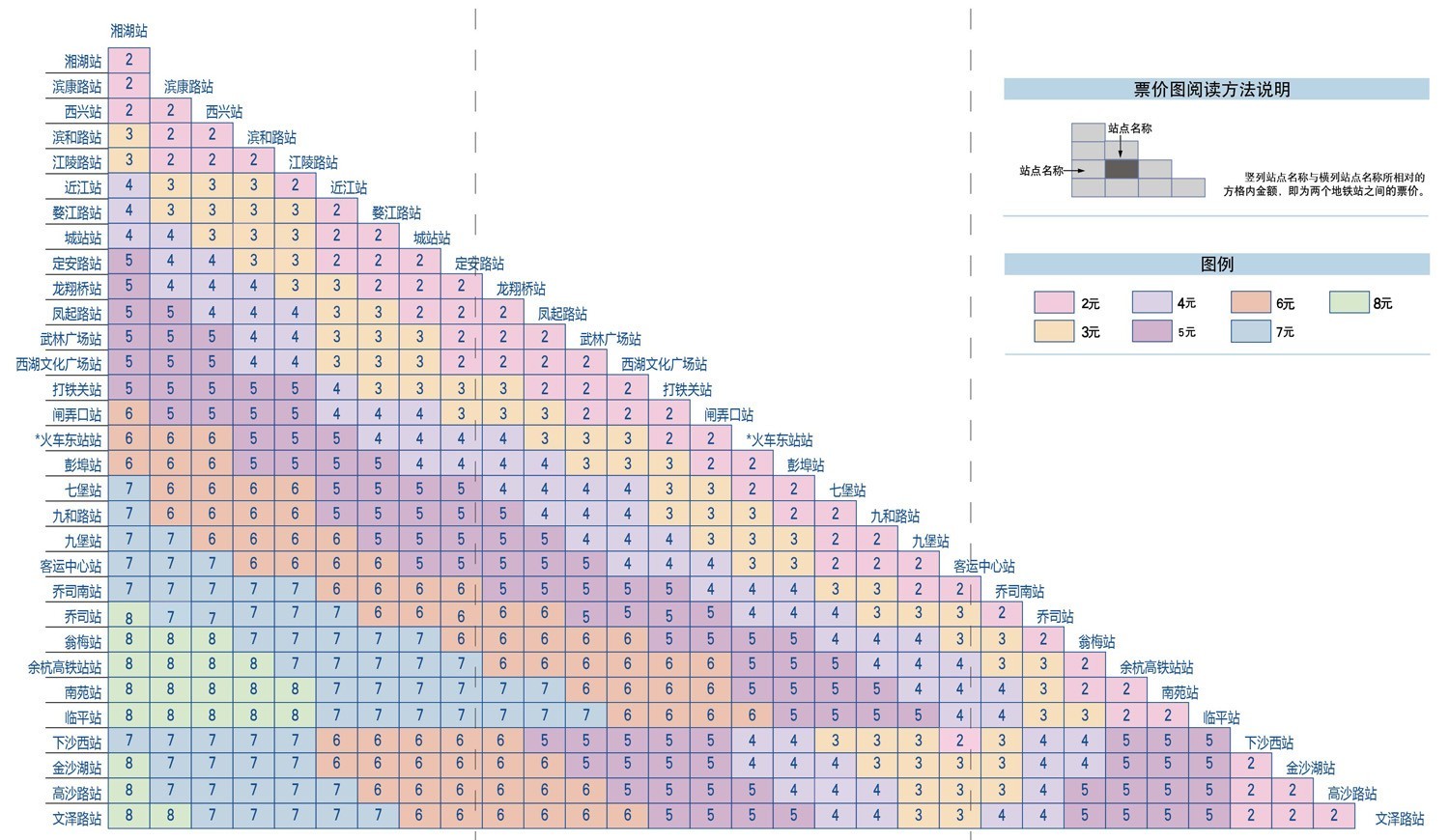
Introduction to Mosaic Plots
A mosaic plot (also known as a Marimekko Chart) is a chart used to display relationships between categorical data. It represents data proportions and classifications through the area and color of rectangles.
Mosaic plots are divided into two types: uniform and non-uniform. Uniform mosaic plots are more common in daily life, such as subway fare charts, while non-uniform mosaic plots are more frequently used in statistical fields.
Other Names: Mosaic Plot, Marimekko Chart
Components of a Mosaic Plot
Non-uniform Axis Mosaic Plot
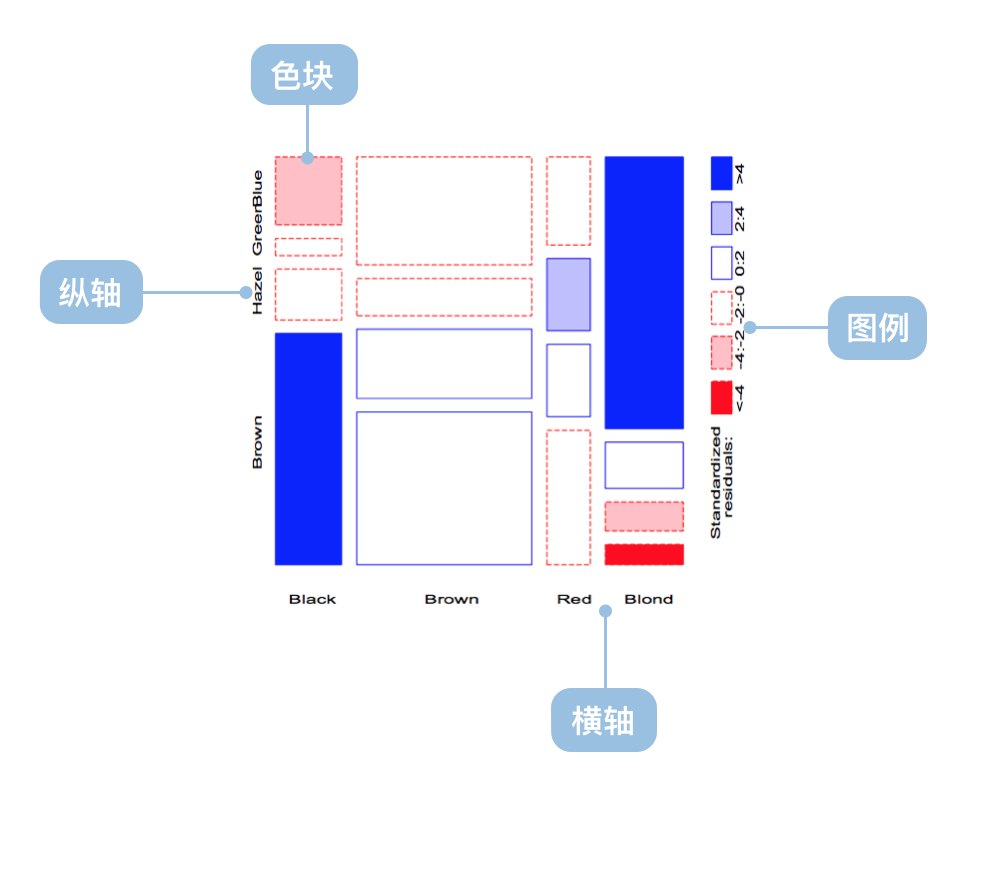
| Chart Type | Non-uniform Axis Mosaic Plot |
|---|---|
| Suitable Data | Multi-dimensional categorical data |
| Functionality | Display distribution of multi-dimensional categorical data |
| Data Mapping | Categorical data fields map to non-uniform coordinate axis Area and color represent data proportions and classifications |
| Data Size Limit | More effective with higher dimensional data |
Uniform Axis Mosaic Plot
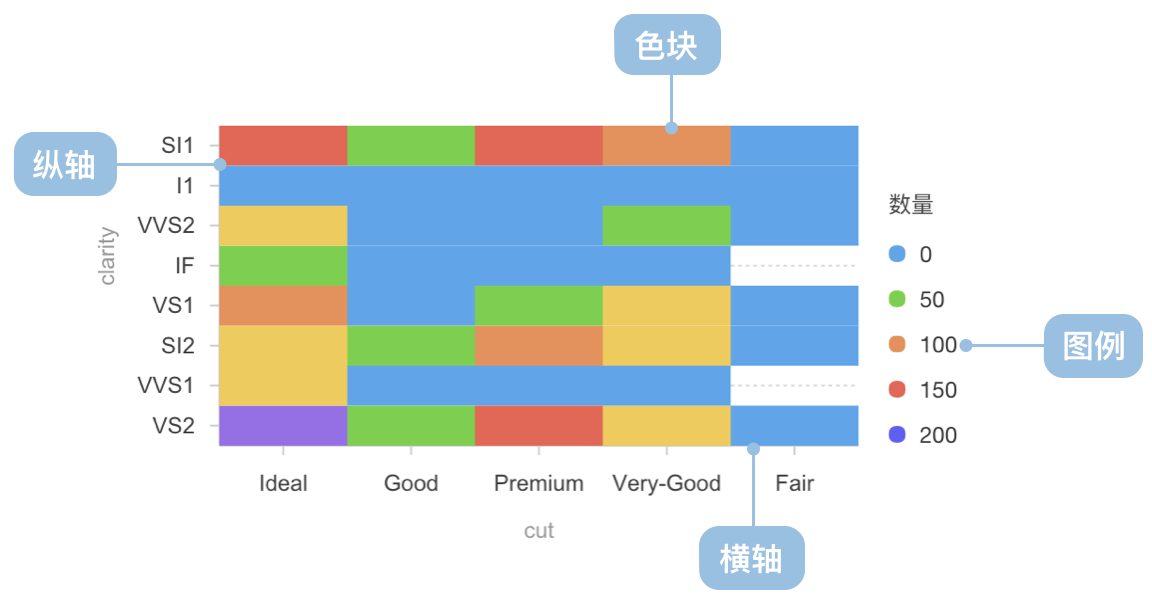
| Chart Type | Uniform Axis Mosaic Plot |
|---|---|
| Suitable Data | Two-dimensional categorical data |
| Functionality | Display distribution of two-dimensional categorical data |
| Data Mapping | Categorical data fields map to uniform coordinate axis Color represents data classifications |
| Data Size Limit | More effective with lower dimensional data |
Use Cases of Mosaic Plots
Suitable Use Cases
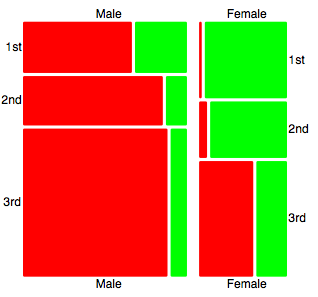
Example 1: Suitable for multi-dimensional categorical data analysis
Example 2: Suitable for two-dimensional categorical data analysis
import * as G2 from '@antv/g2';

const chart = new G2.Chart({
  container: 'container',
  autoFit: true,
  height: 400,
});

chart.options({
  type: 'cell',
  data: [
    { product: 'Phone', region: 'North', sales: 120, category: 'Premium' },
    { product: 'Phone', region: 'East', sales: 180, category: 'Premium' },
    { product: 'Phone', region: 'South', sales: 150, category: 'Premium' },
    { product: 'Computer', region: 'North', sales: 80, category: 'Mid-range' },
    { product: 'Computer', region: 'East', sales: 110, category: 'Mid-range' },
    { product: 'Computer', region: 'South', sales: 95, category: 'Mid-range' },
    { product: 'Tablet', region: 'North', sales: 60, category: 'Mid-range' },
    { product: 'Tablet', region: 'East', sales: 85, category: 'Mid-range' },
    { product: 'Tablet', region: 'South', sales: 70, category: 'Budget' },
    { product: 'Headphone', region: 'North', sales: 40, category: 'Budget' },
    { product: 'Headphone', region: 'East', sales: 55, category: 'Budget' },
    { product: 'Headphone', region: 'South', sales: 45, category: 'Budget' },
  ],
  encode: {
    x: 'product',
    y: 'region',
    color: 'category',
    size: 'sales',
  },
  scale: {
    color: {
      palette: 'category10',
      type: 'ordinal',
    },
    size: {
      type: 'linear',
      range: [0.3, 1],
    },
  },
  style: {
    stroke: '#fff',
    strokeWidth: 2,
    inset: 2,
  },
  legend: {
    color: {
      title: 'Product Category',
      position: 'top',
    },
    size: {
      title: 'Sales Volume',
      position: 'right',
    },
  },
  axis: {
    x: {
      title: 'Product Type',
      labelAutoRotate: false,
    },
    y: {
      title: 'Sales Region',
    },
  },
  tooltip: {
    title: (d) => `${d.product} - ${d.region}`,
    items: [
      { field: 'sales', name: 'Sales', valueFormatter: (v) => `${v}K` },
      { field: 'category', name: 'Category' },
    ],
  },
});

chart.render();
Example 3: Market Segmentation Analysis (Non-uniform Mosaic Plot)
This example demonstrates how to use a non-uniform mosaic plot to display the distribution of different market segments, where the width of each rectangle represents market size, and the height represents the proportion of each market segment.
import { Chart } from '@antv/g2';

const chart = new Chart({
  container: 'container',
  width: 900,
  height: 800,
  paddingLeft: 0,
  paddingRight: 0,
});

chart.options({
  type: 'interval',
  data: {
    type: 'fetch',
    value:
      'https://gw.alipayobjects.com/os/bmw-prod/3041da62-1bf4-4849-aac3-01a387544bf4.csv',
  },
  transform: [
    { type: 'flexX', reducer: 'sum' }, // Flexible X-axis width
    { type: 'stackY' }, // Y-axis stacking
    { type: 'normalizeY' }, // Y-axis normalization
  ],
  encode: {
    x: 'market',
    y: 'value',
    color: 'segment',
  },
  axis: {
    y: false,
  },
  scale: {
    x: { paddingOuter: 0, paddingInner: 0.01 },
  },
  tooltip: 'value',
  labels: [
    {
      text: 'segment',
      x: 5,
      y: 5,
      textAlign: 'start',
      textBaseline: 'top',
      fontSize: 10,
      fill: '#fff',
    },
    {
      text: 'value',
      x: 5,
      y: 5,
      textAlign: 'start',
      dy: 15,
      fontSize: 10,
      fill: '#fff',
    },
  ],
});

chart.render();
Example 4: Movie Rating Distribution Analysis (Density Mosaic Plot)
This example demonstrates how to use a density mosaic plot to analyze the relationship between IMDB and Rotten Tomatoes ratings, where the color intensity represents the number of movies.
import { Chart } from '@antv/g2';

const chart = new Chart({
  container: 'container',
  autoFit: true,
});

chart.options({
  type: 'rect',
  data: {
    type: 'fetch',
    value: 'https://assets.antv.antgroup.com/g2/movies.json',
  },
  encode: {
    x: 'IMDB Rating',
    y: 'Rotten Tomatoes Rating',
  },
  transform: [
    { type: 'bin', color: 'count', thresholdsX: 30, thresholdsY: 20 },
  ],
  scale: {
    color: { palette: 'ylGnBu' },
  },
  tooltip: {
    title: { channel: 'color' },
    items: [
      (d, i, data, column) => ({
        name: 'IMDB Rating',
        value: `${column.x.value[i]}, ${column.x1.value[i]}`,
      }),
      (d, i, data, column) => ({
        name: 'Rotten Tomatoes Rating',
        value: `${column.y.value[i]}, ${column.y1.value[i]}`,
      }),
    ],
    render: () => '1',
  },
});

chart.render();
Example 5: Athletes’ Physiological Data Analysis (Grouped Density Mosaic Plot)
This example shows how to use a mosaic plot to display the height and weight distribution of athletes grouped by gender, with opacity representing data point density.
import { Chart } from '@antv/g2';

const chart = new Chart({
  container: 'container',
  autoFit: true,
});

chart.options({
  type: 'rect',
  data: {
    type: 'fetch',
    value: 'https://assets.antv.antgroup.com/g2/athletes.json',
  },
  encode: {
    x: 'weight',
    y: 'height',
    color: 'sex',
  },
  transform: [{ type: 'bin', opacity: 'count' }],
  legend: {
    opacity: false,
  },
  style: {
    inset: 0.5,
  },
  tooltip: {
    title: { channel: 'opacity' },
    items: [
      (d, i, data, column) => ({
        name: 'Weight',
        value: `${column.x.value[i]}, ${column.x1.value[i]}`,
      }),
      (d, i, data, column) => ({
        name: 'Height',
        value: `${column.y.value[i]}, ${column.y1.value[i]}`,
      }),
    ],
  },
});

chart.render();
Unsuitable Use Cases
Mosaic plots are not suitable for:
- Displaying continuous numerical data trends
- Showing precise numerical comparisons
- Analyzing time series data
- Displaying data with too many categories (which can make the chart cluttered and hard to read)
Comparing Mosaic Plots to Other Charts
Mosaic Plots and Heatmaps
- From graphical properties perspective:
- Heatmaps represent the third dimension with linear color changes
- Mosaic plots represent the third dimension with categorical colors
- Standard heatmaps use smoothing algorithms with no clear boundaries
- Mosaic plots have clear boundaries
- From data perspective:
- Uniform mosaic plots and heatmaps have very similar meanings for continuous data
- From analytical needs perspective:
- Heatmaps focus on distribution and can predict data in unknown areas
- Mosaic plots have clearer boundaries and focus more on comparison
Mosaic Plots and Treemaps
- Mosaic plots are better for showing relationships between multiple categorical variables
- Treemaps are more suitable for displaying hierarchical data structures
- Mosaic plots use position and area to encode data
- Treemaps primarily use area and nesting to represent hierarchical relationships

