
Encode
Visual Channels
The core content of data visualization is visual encoding, which is the technology of mapping data information into visual elements. Just like data contains attributes and values, visual encoding also consists of two parts: Marks and Visual Channels.
- Data Attributes -> Marks: Intuitive representation of data nature classification, usually geometric graphic elements, such as: points, lines, areas, and volumes.
- Data Values -> Visual Channels: Used to express quantitative information of data attributes, including mark position, size, shape, direction, hue, saturation, brightness, etc.
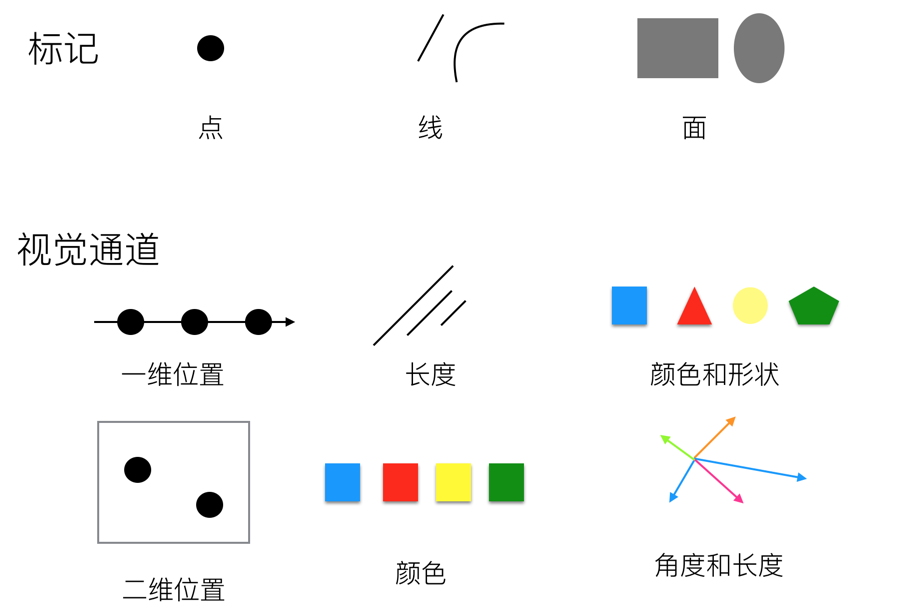
Visual channels can also be called chart attributes. The mapping relationship between raw data and visual channels enables us to quickly obtain information. So we can think of charts as a combination of graphic marks that carry some information, which we call encoded information. When people read information from these symbols, we call it decoding information.
Types of Visual Channels
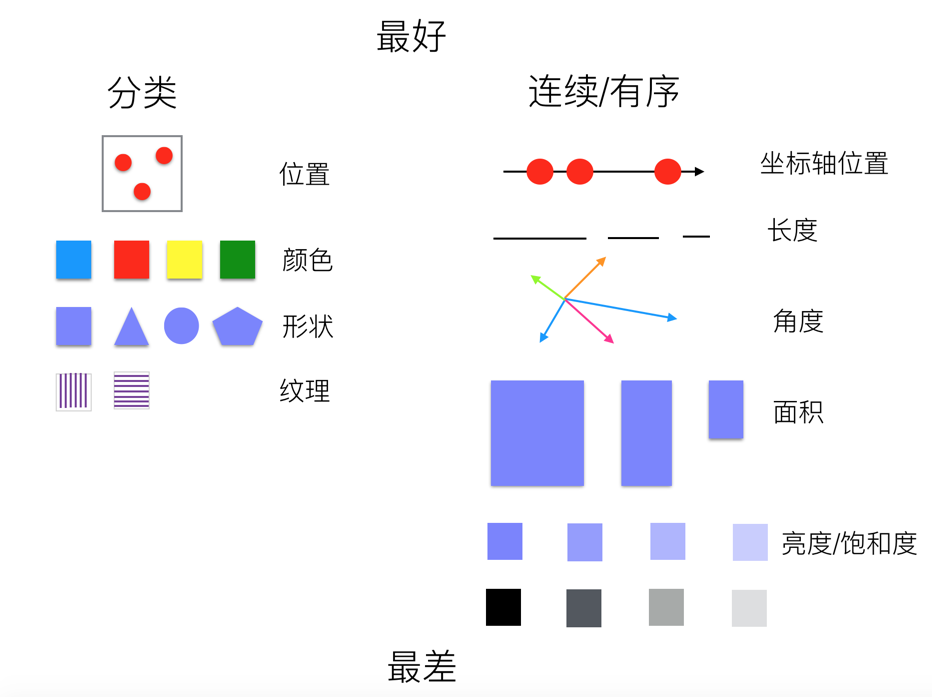
Human recognition of visual channels has two basic perception modes. The first perception mode obtains information about the characteristics and positions of objects themselves, corresponding to the qualitative and categorical properties of visual channels; the second perception mode obtains information about the numerical magnitude of a certain attribute of objects, corresponding to the quantitative or ordinal properties of visual channels. Therefore, we divide visual channels into two major categories:
- Qualitative (categorical) visual channels, such as shape, color hue, and control position.
- Quantitative (continuous, ordered) visual channels, such as line length, area size, spatial volume, slope, angle, color saturation and brightness, etc.
However, the two categories are not absolute. For example, position information can both distinguish different categories and differentiate continuous data.
Expressiveness of Visual Channels
When performing visual encoding, we need to consider the expressiveness and effectiveness of different visual channels, mainly reflected in the following aspects:
- Accuracy: Whether it can accurately express changes between visual data
- Discriminability: The number of categories that can be encoded by the same visual channel, i.e., the upper limit of distinguishable categories
- Separability: When encoded objects of different visual channels are placed together, whether they are easy to distinguish
- Visual prominence: Whether important information uses more prominent visual channels for encoding
The following is a diagram showing the expressiveness of visual channels from best to worst:
G2 Visual Channel Design
Corresponding to visual channels in visual encoding, visual channels in G2 can be divided into the following five graphic attributes:
Position-related Visual Channels

| Visual Channel | Description |
|---|---|
| x | Defines the position of elements in the horizontal direction |
| y | Defines the position of elements in the vertical direction |
| z | Defines the depth position of elements in three-dimensional space |
| x1 | Defines the end position of elements in the horizontal direction |
| y1 | Defines the end position of elements in the vertical direction; stacked bar charts internally calculate y1 channel values |
| series | Distinguishes different data series through spatial position |
| position | Custom composite chart display position, used for parallel coordinates and circular facet charts, etc. |
| position${number} | Custom composite chart display position, used for parallel coordinates and circular facet charts, etc. |
Color-related Visual Channels


| Visual Channel | Description |
|---|---|
| color | Maps data categorical attributes through hue |
| opacity | Controls element transparency, commonly used to highlight focus or express numerical intensity (such as gradient transparency in heatmaps) |
Shape-related Visual Channels

| Visual Channel | Description |
|---|---|
| shape | Distinguishes data categories through geometric forms, suitable for categorical data encoding |
Size-related Visual Channels

| Visual Channel | Description |
|---|---|
| size | Controls element physical dimensions (point radius/line width/bar width), suitable for encoding quantitative data |
Animation-related Visual Channels

| Visual Channel | Description |
|---|---|
| key | Unique identifier for animation elements, used for data updates |
| groupKey | Animation group identifier, used for data updates |
| enterType | Animation type for element entry into scene (such as scale/fade in) |
| enterEasing | Easing function for enter animation |
| enterDuration | Duration of enter animation |
| enterDelay | Delay time for enter animation |
| updateType | Transition animation type for data updates |
| updateEasing | Easing function for update animation |
| updateDuration | Duration of update animation |
| updateDelay | Delay time for update animation |
| exitType | Animation type for element exit from scene (such as slide out) |
| exitEasing | Easing function for exit animation |
| exitDuration | Duration of exit animation |
| exitDelay | Delay time for exit animation |
Encode
To control the style of marks, we often bind a column of data to one of its visual channels.
Here is a set of event planning timeline data:
import { table } from '@antv/astro-theme-antv/table';

await table([
  { name: 'Event Planning', startTime: 1, endTime: 4 },
  { name: 'Venue Logistics Planning', startTime: 3, endTime: 13 },
  { name: 'Select Suppliers', startTime: 5, endTime: 8 },
  { name: 'Rent Venue', startTime: 9, endTime: 13 },
  { name: 'Book Catering Services', startTime: 10, endTime: 14 },
  { name: 'Rent Event Decoration Team', startTime: 12, endTime: 17 },
  { name: 'Rehearsal', startTime: 14, endTime: 16 },
  { name: 'Event Celebration', startTime: 17, endTime: 18 },
], document.getElementById('container')!);
In the following example, we bind the name column in the data to the x channel, and bind the value of endTime column minus startTime column to the y channel. This binding process is called Encode. We often say that a certain visual attribute of a graphic encodes a column of data, and this data-driven attribute is called a Channel. For example, the x and y channels of the interval mark below encode the corresponding column data respectively, clearly showing the relationship between different tasks and time consumption.
import { Chart } from '@antv/g2';

const chart = new Chart({
  container: 'container',
});

chart.options({
  type: 'interval',
  autoFit: true,
  data: [
    { name: 'Event Planning', startTime: 1, endTime: 4 },
    { name: 'Venue Logistics Planning', startTime: 3, endTime: 13 },
    { name: 'Select Suppliers', startTime: 5, endTime: 8 },
    { name: 'Rent Venue', startTime: 9, endTime: 13 },
    { name: 'Book Catering Services', startTime: 10, endTime: 14 },
    { name: 'Rent Event Decoration Team', startTime: 12, endTime: 17 },
    { name: 'Rehearsal', startTime: 14, endTime: 16 },
    { name: 'Event Celebration', startTime: 17, endTime: 18 },
  ],
  encode: {
    x: 'name', // Map task name field to X-axis position
    y: (datum) => datum.endTime - datum.startTime, // Map end time minus start time to Y-axis position
  },
  coordinate: { transform: [{ type: 'transpose' }] },
  axis: {
    x: {
      title: 'Task',
    },
    y: {
      title: 'Time Consumed',
    },
  },
});

chart.render();
When we want to further analyze the temporal relationships of tasks, we need to leverage other visual channels.
In the following example, we bind the startTime column in the data to the y channel, and bind the endTime column to the y1 channel (of course, you can also bind [startTime, endTime] to the y channel, see Array Channels for details). Through this data encoding method, we achieve a Gantt chart effect. To better distinguish different tasks, in addition to encoding the name column data to the x channel, we also bind the name column data to the color channel. This way, through different colors and different x-axis positions, we can better distinguish different tasks.
import { Chart } from '@antv/g2';

const chart = new Chart({
  container: 'container',
});

chart.options({
  type: 'interval',
  autoFit: true,
  data: [
    { name: 'Event Planning', startTime: 1, endTime: 4 },
    { name: 'Venue Logistics Planning', startTime: 3, endTime: 13 },
    { name: 'Select Suppliers', startTime: 5, endTime: 8 },
    { name: 'Rent Venue', startTime: 9, endTime: 13 },
    { name: 'Book Catering Services', startTime: 10, endTime: 14 },
    { name: 'Rent Event Decoration Team', startTime: 12, endTime: 17 },
    { name: 'Rehearsal', startTime: 14, endTime: 16 },
    { name: 'Event Celebration', startTime: 17, endTime: 18 },
  ],
  encode: {
    x: 'name', // Map task name field to X-axis position
    y: 'startTime', // Map task start time field to y position
    y1: 'endTime', // Map task end time field to y1 axis position
    color: 'name', // Map task name field to color
  },
  coordinate: { transform: [{ type: 'transpose' }] },
  axis: {
    x: {
      title: 'Task',
    },
    y: {
      title: 'Time',
    },
  },
});

chart.render();
This is already a relatively complete Gantt chart. If you want to emphasize the time sequence, you can use animation-related visual channels in G2 to achieve temporal animation effects. The following example encodes the enterDuration and enterDelay channels, making the enter animation delay time and duration of marks corresponding to different tasks correlate with the start time and end time in the data.
import { Chart } from '@antv/g2';

const chart = new Chart({
  container: 'container',
});

chart.options({
  type: 'interval',
  autoFit: true,
  data: [
    { name: 'Event Planning', startTime: 1, endTime: 4 },
    { name: 'Venue Logistics Planning', startTime: 3, endTime: 13 },
    { name: 'Select Suppliers', startTime: 5, endTime: 8 },
    { name: 'Rent Venue', startTime: 9, endTime: 13 },
    { name: 'Book Catering Services', startTime: 10, endTime: 14 },
    { name: 'Rent Event Decoration Team', startTime: 12, endTime: 17 },
    { name: 'Rehearsal', startTime: 14, endTime: 16 },
    { name: 'Event Celebration', startTime: 17, endTime: 18 },
  ],
  encode: {
    x: 'name', // Map task name field to X-axis position
    y: 'startTime', // Map task start time field to y position
    y1: 'endTime', // Map task end time field to y1 axis position
    color: 'name', // Map task name field to color
    enterDuration: (datum) => datum.endTime - datum.startTime, // Map task end time minus start time to enter animation duration
    enterDelay: 'startTime', // Map task start time to enter animation delay time
  },
  scale: { enterDuration: { zero: true, range: [0, 3000] } },
  coordinate: { transform: [{ type: 'transpose' }] },
  axis: {
    x: {
      title: 'Task',
    },
    y: {
      title: 'Time',
    },
  },
});

chart.render();
Configuration Levels
Encode in G2 is mainly used to specify the relationship between visual element attributes and data. You can specify encoding at the Mark level:
({
  type: 'interval',
  encode: {
    x: 'name',
    y: 'value',
  },
});
You can also specify encoding at the View level:
({
  type: 'view',
  encode: {
    x: 'name',
    y: 'value',
  },
});
Channel encoding has transitivity. View encoding will be passed to marks specified by children. If the mark doesn’t have encoding for the corresponding channel, it will be set; otherwise, nothing will be done. For example, drawing a point-line chart:
import { Chart } from '@antv/g2';

const chart = new Chart({
  container: 'container',
});

chart.options({
  type: 'view',
  data: [
    { year: '1991', value: 3 },
    { year: '1992', value: 4 },
    { year: '1993', value: 3.5 },
    { year: '1994', value: 5 },
    { year: '1995', value: 4.9 },
    { year: '1996', value: 6 },
    { year: '1997', value: 7 },
    { year: '1998', value: 9 },
    { year: '1999', value: 13 },
  ],
  encode: { x: 'year', y: 'value' }, // View-level encoding
  children: [
    { type: 'line' },
    { type: 'point' },
  ],
});

chart.render();
Configuration Options
A complete encoding consists of encode.type and encode.value.
After encoding, an array will be generated under the specified channel according to the encoding method.
| Encoding Method | type | value | Description |
|---|---|---|---|
| Field Encoding | field |
string | Field name of a data column |
| Function Encoding | transform |
(value, index, array) => number | string | boolean | Date |
Specify channel binding through callback function |
| Constant Encoding | constant |
any | Specify channel value as constant |
| Data Encoding | column |
number[] | string[] | boolean[] | Date[] | Specify channel value as an array |
G2 provides syntactic sugar, and in most cases encode.type can be omitted.
({
  type: 'point',
  encode: {
    x: { type: 'field', value: 'weight' },
    y: { type: 'field', value: 'height' },
    color: { type: 'field', value: 'gender' },
  },
});
You can also use syntactic sugar to simplify the writing:
// Syntactic sugar
({
  type: 'point',
  encode: {
    x: 'weight',
    y: 'height',
    color: 'gender',
  },
});
Field Encoding
Specify channel binding to a certain column of data:
(data) => data.map((d) => d[value]);({
type: 'interval',
encode: { x: { type: 'field', value: 'name' } },
});// Syntactic sugar
({
type: 'interval',
encode: { x: 'name' },
});Function Encoding
Specify channel binding to newly generated data:
(data) => data.map(value);({
type: 'interval',
encode: {
color: {
type: 'transform',
value: (d) => (d.value > 100 ? 'high' : 'low'),
},
},
});// Syntactic sugar
({
type: 'interval',
encode: {
color: (d) => (d.value > 100 ? 'high' : 'low'),
},
});You can also generate corresponding channel legends in multi-axis charts through function encoding.
import { Chart } from '@antv/g2';

const chart = new Chart({
  container: 'container',
});

chart.options({
  type: 'view',
  autoFit: true,
  data: [
    { time: '10:10', call: 4, waiting: 2, people: 2 },
    { time: '10:15', call: 2, waiting: 6, people: 3 },
    { time: '10:20', call: 13, waiting: 2, people: 5 },
    { time: '10:25', call: 9, waiting: 9, people: 1 },
    { time: '10:30', call: 5, waiting: 2, people: 3 },
    { time: '10:35', call: 8, waiting: 2, people: 1 },
    { time: '10:40', call: 13, waiting: 1, people: 2 },
  ],
  children: [
    {
      type: 'interval',
      encode: {
        x: 'time',
        y: 'waiting',
        color: () => 'waiting',
        series: () => 'waiting',
      },
      scale: { y: { nice: true } },
      axis: { y: { title: 'Waiting' } },
    },
    {
      type: 'interval',
      encode: {
        x: 'time',
        y: 'people',
        color: () => 'people',
        series: () => 'people',
      },
      scale: { y: { independent: true } },
      axis: { y: { position: 'right', grid: null, title: 'People' } },
    },
    {
      type: 'line',
      encode: { x: 'time', y: 'call', color: () => 'call' },
      scale: { series: { independent: true } },
    },
  ],
});

chart.render();
Function encoding can also disable certain channels in some cases. In G2, when the series channel is not defined and the color channel is already defined, a copy of values will be made to the series channel to achieve categorization effects. In the following example, the color channel is mapped to a continuous field. If the series is also mapped to a continuous field, it will affect the display of gradient lines, so you need to disable it with series: () => undefined.
import { Chart } from '@antv/g2';

const chart = new Chart({
  container: 'container',
});

chart.options({
  type: 'area',
  autoFit: true,
  data: {
    type: 'fetch',
    value: 'https://assets.antv.antgroup.com/g2/temperatures3.json',
  },
  encode: {
    x: (d) => new Date(d.date),
    y: ['low', 'high'],
    color: (d) => d.high - d.low,
    series: () => undefined,
  },
  scale: { color: { palette: 'reds' } },
  style: { gradient: 'x' },
  axis: { x: { title: 'date' } },
});

chart.render();
Constant Encoding
Specify channel value as a constant, often used to specify color channels or size channels, setting marks to a certain color or size. This encoding method will not generate legends for the corresponding channels.
(data) => data.map(() => value);({
type: 'point',
encode: {
color: { type: 'constant', value: 'steelblue' },
size: { type: 'constant', value: 10 },
},
});// Syntactic sugar
({
type: 'interval',
encode: {
color: 'steelblue',
size: 10,
},
});Data Encoding
Specify the value of a certain channel as an array.
() => value;({
type: 'line',
encode: {
x: { type: 'column', value: [0, 1, , 2, 3] },
},
});For some big data scenarios, using array columns would be more suitable. Here’s a simple example.
import { Chart } from '@antv/g2';

const I = [0, 1, 2, 3, 4];
const X = I.map((i) => ((i - 2) * Math.PI) / 2);
const Y = X.map((x) => Math.sin(x));

const chart = new Chart({
  container: 'container',
});

chart.options({
  type: 'line',
  data: I,
  encode: {
    x: {
      type: 'column',
      value: X,
    },
    y: {
      type: 'column',
      value: Y,
    },
    shape: 'smooth',
  },
});

chart.render();
Array Channels
Of course, for position-related visual channels: such as x and y channels, often more than one column of data is needed. For example, in a waterfall chart, you can specify multiple columns for one channel through an array.
import { Chart } from '@antv/g2';

const chart = new Chart({
  container: 'container',
});

chart.options({
  type: 'interval',
  data: [
    { month: 'Jan.', profit: 387264, start: 0, end: 387264 },
    { month: 'Feb.', profit: 772096, start: 387264, end: 1159360 },
    { month: 'Mar.', profit: 638075, start: 1159360, end: 1797435 },
    { month: 'Apr.', profit: -211386, start: 1797435, end: 1586049 },
    { month: 'May', profit: -138135, start: 1586049, end: 1447914 },
    { month: 'Jun', profit: -267238, start: 1447914, end: 1180676 },
    { month: 'Jul.', profit: 431406, start: 1180676, end: 1612082 },
    { month: 'Aug.', profit: 363018, start: 1612082, end: 1975100 },
    { month: 'Sep.', profit: -224638, start: 1975100, end: 1750462 },
    { month: 'Oct.', profit: -299867, start: 1750462, end: 1450595 },
    { month: 'Nov.', profit: 607365, start: 1450595, end: 2057960 },
    { month: 'Dec.', profit: 1106986, start: 2057960, end: 3164946 },
    { month: 'Total', start: 0, end: 3164946 },
  ],
  encode: {
    x: 'month',
    y: ['end', 'start'], // Equivalent to y:'end', y1:'start'
    color: (d) =>
      d.month === 'Total' ? 'Total' : d.profit > 0 ? 'Increase' : 'Decrease',
  },
  axis: { y: { labelFormatter: '~s' } },
});

chart.render();
You can also specify them separately using the ${channel}${index} format:
// Equivalent to the above form
chart.options({ type: 'view', encode: { y: 'end', y1: 'start' } });